
FORTNITE
BUILDING · EDITING · HIGH FPSZERO DELAY31 Windows tweaks15 Zero Delay settings
Gaming tweaks, game presets and a one-switch Zero Delay mode for Windows 10 and 11. Every setting is backed up before it changes, and one click puts it all back.
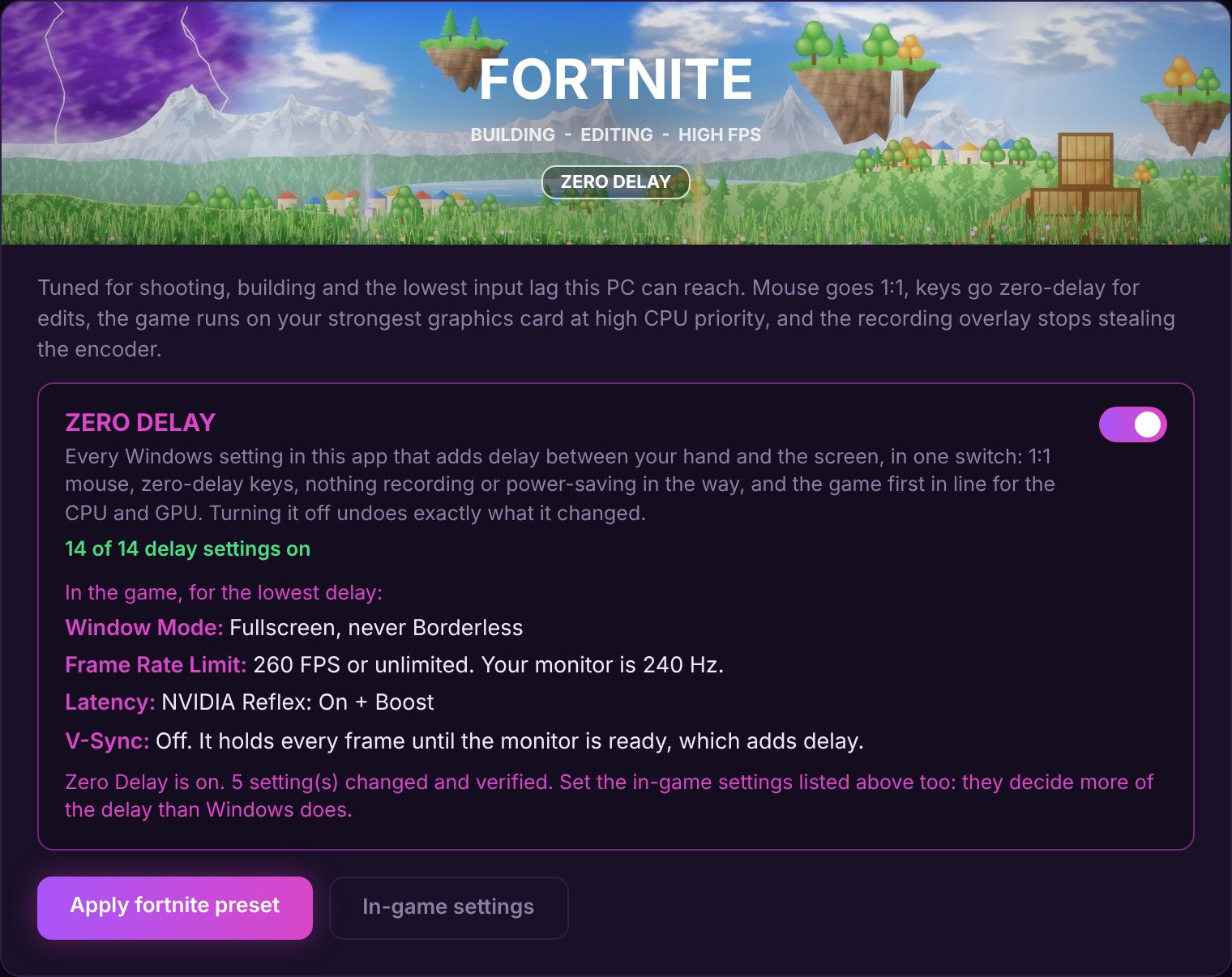
Every game preset has it. It turns on every delay-cutting setting in the app, lists the game's own delay settings, and turns off again in one click.
Your numbers, measured on your PC in your game by Intel PresentMon. We don't print FPS gains we never measured on your machine.
Load into a match or a replay and press Measure before. It records 60 seconds.
Turn on your game's preset and Zero Delay, then set the in-game settings on the card.
Play the same way for another 60 seconds. The app shows both, side by side.
| Measured | Before | After |
|---|---|---|
| Average FPS | — | — |
| 1% low FPS | — | — |
| 0.1% low FPS | — | — |
| Input delay, typical | — ms | — ms |
| Input delay, slowest 5% | — ms | — ms |
This is the app's Benchmarks results table. Your own runs fill it in. A PC that is already set up well gains little; one with background recording, power saving and mouse acceleration all on gains a lot.
Each preset is a bundle of Windows tweaks picked for that game, plus the in-game settings that go with it, and a Zero Delay switch for every delay-cutting setting.









The real counts from the app. Most Zero Delay settings are already in the preset; the switch turns on the rest.
The two overlap: most Zero Delay settings are already in the preset. Streaming leaves out CPU priority, which slows the stream encoder.
110 real Windows settings, each the same switch you would find in Windows itself. Search them, turn them on one at a time, and undo any of them.
Game Mode, GPU scheduling, game priority in the Windows scheduler, power plans, no background recording, and Fortnite on your strongest graphics card at high CPU priority.
1:1 mouse with acceleration off, zero-delay keys for edits, no Sticky Keys or Narrator pop-ups mid-game, and USB power saving off so your mouse never sleeps.
Ads, Widgets, the startup delay, Store apps in the background, Start menu and taskbar clutter, pop-ups and surprise update restarts. Plus game audio that stays loud during Discord calls.
A real ping, jitter and packet-loss test with a plain-English verdict, Windows' update sharing turned off, and the much-hyped Nagle tweak labelled as disputed so you can test it yourself.
Telemetry down to the minimum Windows allows, the advertising ID, activity history, tailored ads, Recall and Copilot switched off, with Microsoft's own policy settings.
Every original value is saved to your disk before anything changes. One button puts it all back, newest first, and a change log shows exactly what happened.
Plus 19 File Explorer, browser and security tweaks, a startup apps manager, Pre-Game Boost and a nine-mode aim trainer with a sensitivity converter.
Switching off protection makes a benchmark look better and leaves you open. Left out.
That is how people get banned. The app never reads or edits a game's files.
Weak evidence, and a mistake can stop a PC booting. Left out.
No measurable gain, and they break Windows Update weeks later. Left out.
No tiers and no subscription. One licence key unlocks the whole app on your PC.
Cash App payments open soon.
Pick who to send it to, then tap the button and pay on Cash App. The amount is filled in for you.
Put your Discord name in the payment note, then make a ticket in our Discord. Staff send your key there.
Paste the key on the Licence page in the app. It activates once, on one PC.
After you pay, join and make a ticket with your Discord name. Tickets are also how to get help with a key, a payment or the app.
Every tweak is a setting you could change yourself in Windows' own menus. The app shows you the list first, saves the original value of each setting to your disk before changing it, and checks afterwards that the change actually took. The Restore Centre undoes all of it in one click.
It never switches off Defender, the firewall or Core Isolation, never removes parts of Windows, and never edits a game's files.
No. It never reads, writes or injects anything into a game, and it never interacts with anti-cheat. Game presets show you settings to type into the game's own menu yourself, and the Windows tweaks are ordinary Windows settings.
64-bit Windows 10 and Windows 11. A few tweaks only exist on newer Windows 11 builds; the app checks your build and marks those "Not supported on this PC" instead of applying them.
Nobody can answer that without measuring your PC. On a machine that is already set up well, very little. On one that is recording in the background with power saving and mouse acceleration on, a lot. The Benchmarks page measures your frame rate and input delay before and after, so you see your own numbers.
It turns on every setting in the app that cuts delay between your hand and the screen: 1:1 mouse, zero-delay keys, Game Mode, no background recording, GPU scheduling, the game first in line for the CPU, no USB or CPU power saving, and variable refresh rate. Each game card also lists that game's own delay settings, like NVIDIA Reflex. No software makes delay literally zero; your mouse, monitor and the game all take some time.
Open the Restore Centre and press Undo everything. Every setting goes back exactly as it was. The original values are stored in a plain file on your disk that you can read yourself.
Most of it does not. The 30 tweaks that change a machine-wide setting are marked ADMIN, and the app only asks when you pick one of those.
No. That box appears for any program not signed with a paid code-signing certificate. Click More info, then Run anyway. You are right to be careful about that box in general.
Only what the licence needs: your licence number, a renewal secret and a one-way fingerprint of your PC. Nothing about your hardware, games or settings. The only other connection is the ping test on the Network page. There is no telemetry and no background service.
Pay $20 with Cash App and put your Discord name in the note, then make a ticket in our Discord. Staff send your key in the ticket once the payment has come through. Keys are made by hand, so it is not instant, but you only do it once.
Join our Discord and make a ticket. That is the fastest way to get help with a key, a payment or the app.
Undo your changes first. This app is the only thing that remembers your original settings, so uninstalling without undoing leaves the changes in place.
Download it, activate your key, and see exactly what it would change before it changes anything.